Webflow Practitioner vs. Visual Developer 2026: What the Gap Means for a Senior Developer and the Clients They Build For

Recently, I took and passed Webflow’s new Visual Developer certification.
Because it was only released at the end of March 2026, I was curious to see how Webflow is starting to define a more advanced, production-level standard for the platform. The timing made it interesting on its own, but what really pulled me in was the focus of the exam itself. It felt like a certification built around the kind of Webflow work that matters most in real projects.
I’ve never really looked at certifications as something I need in order to prove my skills to other people. For me, they’ve always been more like checkpoints, a structured way to challenge myself, stay sharp, and keep learning. I actually enjoy that side of it. There’s a bit of gamification in the process: you prepare, test yourself, and see whether your practical experience holds up against a formal benchmark.
What made this one especially interesting is that it reflects a more advanced layer of Webflow work, so not just building pages, but thinking through systems, scalability, collaboration, and production quality. That is also a big part of why it felt relevant not only to me personally, but to the kind of Webflow work we care about at Povio.
Webflow now has two certifications. Practitioner covers building in Webflow. Visual Developer, released April 2026, covers the systems behind production-ready Webflow websites. This blog breaks down the gap from a senior developer perspective and explains what it delivers for clients.
What Is the Webflow Visual Developer Certification and Who Is It For?
In simple terms, this exam is less about knowing where buttons are in Webflow and more about those who architect, own, and refine production-ready sites.
That is what made it stand out to me. It feels much closer to real-world Webflow work than a more general or entry-level certification. It reflects the kind of thinking that matters when you are not just building a page, but structuring a website to be scalable, maintainable, and ready for real production use.
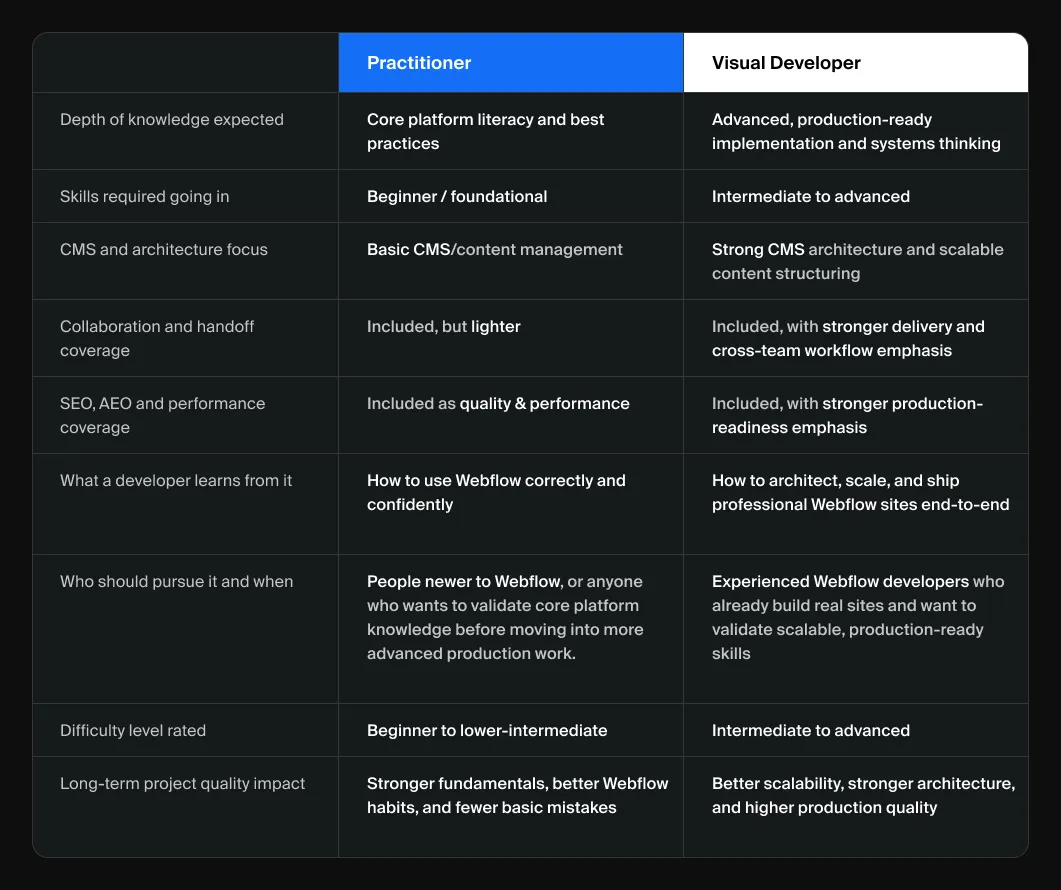
The guide makes that distinction pretty clearly. It describes a Practitioner as someone working within an established system, while a Visual Developer is expected to design and maintain the systems themselves.
At Povio, that mindset matters a lot to us. We care about how websites are built behind the scenes, not just how they look on launch day.
Clean CMS architecture, reusable systems, long-term maintainability, and production readiness are all part of building well in Webflow, and this certification maps much more closely to that level of work.
How Did a Senior Webflow Developer Prepare for the Visual Developer Exam?
Honestly, a lot of the preparation came from real project work.
The official materials definitely help, and Webflow University is useful for reviewing things in a more structured way. But I think the most valuable preparation still comes from doing the work: building real websites, solving technical problems, structuring CMS collections properly, creating reusable systems, and thinking through delivery details before a site goes live.
So in my case, the preparation was really a mix of hands-on client projects, day-to-day Webflow work, the official exam guide, and some review through Webflow University.
That is probably another reason the exam felt so relevant: the topics it covers overlap heavily with the kinds of challenges we already solve in Webflow projects at Povio.
How Should You Prepare for the Webflow Visual Developer Certification in 2026?
If you’re planning to take the exam yourself, I’d definitely recommend going through Webflow’s official Visual Developer learning path.
It is a very useful area because it is built specifically to help people prepare for this certification. It gives you a more structured way to review the topics covered in the exam and can help fill gaps if some areas are not part of your daily workflow yet.
One of the most useful parts is the “Test your knowledge” section at the end. It lets you challenge yourself with practice questions similar to the ones you’ll find on the real Webflow Visual Developer certification exam.
That part can help a lot, because it gives you a clearer sense of the kind of thinking the exam expects and helps you prepare much better before taking the real test.
What Is the Webflow Visual Developer Exam Format?
The format itself is pretty straightforward. It’s an AI-proctored online exam with 50 questions, a 90-minute time limit, and a passing score of 77%.
The guide also notes that the questions are multiple-choice and multi-select, that there is no penalty for incorrect answers, and that some questions may be unscored for internal data gathering.
So the format is not really the hard part. The real challenge is the breadth of knowledge it covers and the level of judgment it expects.
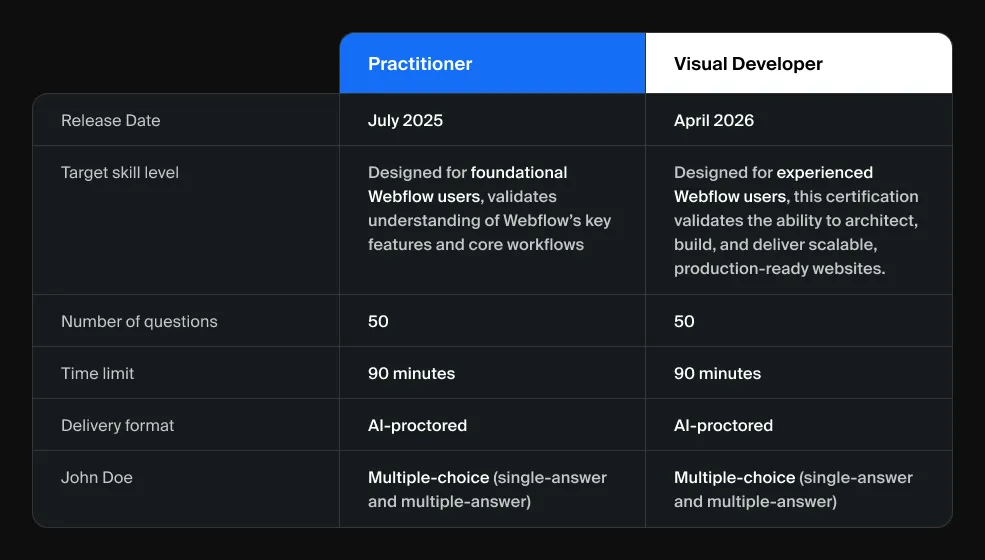
How Difficult Is the Webflow Visual Developer Exam Compared to Practitioner?
I would not call it beginner-level.
It felt fair, but only if you already think beyond page-building and into production-ready systems. Someone who has only used Webflow casually will probably find it difficult. But for people who work with CMS architecture, reusable components, responsiveness, accessibility, SEO/AEO, and publishing workflows on real projects, it feels much more aligned with actual day-to-day work.
That’s also what I liked about it. It feels much closer to the level of thinking required in serious client work, which is exactly where Povio wants to keep raising the bar.
What Kind of Questions Does the Webflow Visual Developer Exam Ask?
At a high level, the exam covers five main areas: build and design, content management, site configuration and forms, site delivery and collaboration, and quality and performance.
That breakdown already tells you a lot. This is not a narrow exam focused on one feature or one workflow. It spans the full reality of building and shipping Webflow sites.
In practice, that means questions around responsive layout decisions, scalable class structures, interactions and animations, reusable components, design systems, CMS collections, reference and multi-reference fields, localization concepts, site settings, forms, integrations, publishing workflows, stakeholder collaboration, redirects, schema markup, accessibility, and performance best practices.
Without giving too much away, the exam does not just ask whether you know a feature exists. It pushes more on whether you understand the best way to use it in a realistic project context. Some questions are clearly about structure and scalability, some are about maintainability across breakpoints, some are about making good publishing and review decisions, and some are about balancing motion, usability, accessibility, and performance.
That was one of the stronger parts of the exam for me. It feels much closer to practical decision-making than to pure memorization.
What Does the Webflow Visual Developer Exam Test That Most People Do Not Expect?
What surprised me most was how little it felt like trivia.
Even the sample questions in the guide point in that direction. They focus on things like choosing the most scalable CMS setup, creating consistent layouts across breakpoints, supporting SEO/AEO and performance before publishing, and thinking about motion together with accessibility.
That, to me, is the right way to evaluate advanced Webflow work.
Because in real projects, strong Webflow work is not about remembering random details. It’s about making good structural decisions early, so the site is easier to manage, easier to scale, and more reliable over time. That is also the kind of standard we care about at Povio when building for clients.
What Does Passing the Webflow Visual Developer Certification Teach a Senior Developer?
More than anything, it reinforced something I already believed: strong Webflow work is really about systems.
Anyone can put together a page that looks fine at first glance. The harder part is building something that is scalable, reusable, easy to maintain, and clear for both teammates and content editors later on.
That’s the layer of work that often matters most in real client projects, and this exam did a good job reflecting that. It also reinforced something that feels very relevant at Povio: the best work happens when visual quality, structure, and long-term maintainability all come together.
What Does the Webflow Visual Developer Certification Mean for Clients?
For clients, this kind of milestone is not really about the credential on its own. It’s about what sits behind it: a stronger understanding of how to make good structural decisions in Webflow from the start.
That means thinking beyond visual polish and paying attention to the parts that shape long-term project quality: CMS architecture, maintainability, editor experience, accessibility, SEO/AEO, responsiveness, performance, and smoother delivery across teams.
In practice, that leads to better decisions earlier. It can mean cleaner CMS setups, more reusable components, better scalability, fewer avoidable handoff issues, more thoughtful publishing workflows, and stronger foundations for SEO/AEO and accessibility.
These are the kinds of decisions that do not always stand out immediately on launch day, but they matter a lot over the lifetime of a website. That is exactly why this certification feels meaningful in a Povio context too: it aligns with the kind of quality, structure, and long-term value we want our clients to get from every Webflow project.
How Does the Webflow Visual Developer Standard Shape How Povio Builds for Clients?
At Povio, we don’t see Webflow as just a faster way to launch pages. We see it as a serious platform for building structured, scalable, and production-ready websites for modern teams.
We care about building websites that are not only visually polished and scalable, but also ready for how digital discovery is evolving, with stronger SEO/AEO foundations and workflows shaped by AI.
That broader mindset is a big part of what makes this certification meaningful to me. It reflects the kind of Webflow work I care about personally, but it also reflects the standards we want to keep raising at Povio for the clients we build for.
Is the Webflow Visual Developer Certification Worth It in 2026?
For me, taking the Visual Developer exam was a fun challenge and a useful checkpoint.
But what made it genuinely interesting is that it mirrors a broader shift in Webflow itself toward more mature, system-based, production-ready work. The guide frames a Visual Developer as someone who designs and maintains systems, not just someone working within them, and I think that distinction says a lot.
That is a direction I care about personally, and it is also one that fits naturally with how we approach Webflow at Povio: not just building websites that look polished, but building websites that are structured well, scalable over time, and more valuable for clients long after launch.
%25201.webp)
.avif)